123
Showing posts with label Dota tool. Show all posts

January 01, 2016

WVS - Warcraft Version Switcher 1.61 - 1.26a

Warcraft version switcher 1.26a and 1.24e download

It contains Warcraft 3 patch version files which allows you to switch between multiple Warcraft 3 versions easily without any problems. This version of WVS will allow you to upgrade/downgrade from Warcraft 1.24e to Warcraft 1.26a and 1.26a to 1.24e. You can play & watch older version games with it.

Guide:
• Download the Warcraft Version Switcher 1.61 from the link above.
  (Download TFT Version 1.26.zip or TFT Version 1.24e.zip if you already have other patch files & version switcher program)
• Extract the files to any folder using WinRaR.
• Run Wvs.exe and click the Options button.
• Set your Warcraft 3 path (where your Wc3 is is installed)
• Click (1st button) Switch Version and double click your desired Warcraft 3 version.
• Your version will be switched!

Read more

TFT Version 1.26a.zip download

Warcraft 1.26a Patch Zip File for Version Switcher - tft version 1.26 a.zip free download

Free Download Warcraft 1.24a Patch TFT Version 1.24a.zip - Are you looking for this TFT Version 1.26a.zip ? You're come into right Blog because I'll give you 100% Working Download Link for this Patch, so you can easily change your Warcraft Version into 1.26a Version

Warcraft 1.26a Patch Changelog :
  • Hex will no longer provide a speed boost to a Hero if cast at the end of Metamorphosis or Chemical Rage effects.
  • Reverted the 1.25b fix, "Hex will no longer extend the duration of Metamorphosis."
  • Fixed an issue where some Mac patches could lead to disconnections during Battle.net games.
If you still don't have WVS 1.61 you can Download Warcraft Version Switcher 1.61 from this 
After Downloading the patch tft version zip file(s), DO NOT EXTRACT THEM. Just copy the files and paste in your "wvs" folder of Warcraft Version Switcher.
Now run wvs.exe & you're done.
Link Download:
Read more

TFT Version 1.24e.zip download

Warcraft 1.24e Patch Zip File for Version Switcher - tft version 1.24 e.zip free download

Free Download Warcraft 1.24e Patch TFT Version 1.24e.zip - Are you looking for this TFT Version 1.24e.zip ? You're come into right Blog because I'll give you 100% Working Download Link for this Patch, so you can easily change your Warcraft Version into 1.24e Version

Fixed :
  • Fixed an exploit rendering buildings non-interactable ("tower hack").
  • Fixed an exploit allowing a player to bypass a summon ability's cooldown ("summon/cooldown hack").
  • Fixed a client crash related to workers failing to build in an unintended way ("new crash hack").
  • Fixed an exploit allowing the Blood Mages's Phoenix to be resurrected instantly ("phoenix hack").
  • Fixed a bug allowing players to select an invalid matchmaking race resulting in all the player's units and buildings becoming sheep ("sheep hack").
If you still don't have WVS 1.61 you can Download Warcraft Version Switcher 1.61 from this
After Downloading the patch tft version zip file(s), DO NOT EXTRACT THEM. Just copy the files and paste in your "wvs" folder of Warcraft Version Switcher.
Now run wvs.exe & you're done.
Download:
Read more

October 10, 2014

Wardota 2 Compilation V2

What's new now from the first version?

-New Hud Jolly Rogers.
-New Terrain.
-New Range Missiles.
-New Trees.
-New Heroes.
-Fixed all bugs from first version.
-Added Weather Effect Like Dota Hq (-weather Snow)
-Added Courier.
-New Doodads
-No Lag, Errors, or big bugs.

This Patch it's perfect for online games.
Can be much complete but i think it's enaught for online games

Downloads:
Part 1: http://tinyurl.com/lp4s4ua
Part 2: http://tinyurl.com/m4z7l7b
Part 3: http://tinyurl.com/n7bgmgr
Maps: http://tinyurl.com/lxjyp7h
Install: http://tinyurl.com/mmnnelt

Instructions:
It's easy to use it, you have just few steps, lets see:

- The first step: Download Par1, Part2, Part3, Maps and Install.
- The second step: Extract in warcraft 3 folder the content from Part1, Maps and Install.
- The third step: Replace War3patch.mpq when your pc ask for this.
- The Last Step: Install this 2 files from you warcraft 3 folder "Enable Local Files and SoundSettingWC3"

Important: You Need to have in warcraft3 / Settings/ Video all Details at High (but if you don't have a very good PC you can put low at LIGHTS.)
Read more

May 11, 2014

Garena Total v5.8


From May 11/2013, Garena Total 5.8 has been converted completely free .
You will not need to load the message or scratch card to activate again.

Changelogs version 5.8:
Auto Join
BIGGEST CHANGE TO AUTO JOIN FEATURE EVER:
You can double-click on a room to auto-join (don't need using F8)
To stop, press Esc (or close joinning panel)

Main App
- Updated languages: en, vi, ph, ge, fa

Auto Join:  Garena automatically join the room without waiting 5 seconds.You can minimize Garena and do their work.
 Auto Tunnel: Automatic tunnel all players in the room while you are playing games or doing other work.
 Warcraft Hotkey: Replacement the hotkey of Warcraft to help more convenient gaming.
 Quick Message: Chat fast on Garena War3 or just a shortcut.
 Auto detect: Automatic detection of Garena offset so that Garena Total can patch all Garena version.

Auto Run: Automatically run other programs with Garena Total.

Download: Game2e.com Garena Total v5.8.zip  (831 KB)
Read more

December 03, 2013

Shant DotA Hotkey v5.8c

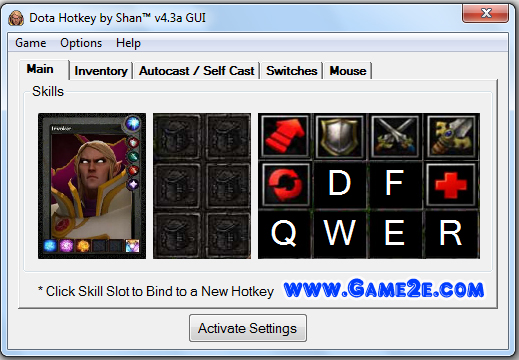
Shan™ Dota Hotkey is a user friendly and handy tool for Warcraft 3. It allows you to customize/set Warcraft 3 Skill, Inventory, Autocast Hotkeys and In-Game Messages.

You can remap your Skill, Inventory, Autocast Hotkeys and In-Game Messages keys to any key you want. Shan™ Dota Hotkey can run on Windows 7, Vista and XP without any problems. This tool has other great features too, check them out!

My goal in making this Hotkey/Warkey is to be able to experience/practice Dota 2 gameplay while in the environment of Dota 1/Warcraft III. This started out only for fun by trying to automate Kael's Invoking. then I decided to go all out.

Download: Game2e.com ShanT DotA Hotkey v5.8c.zip

Important!
Each time a game starts/load press refresh hotkey and call your hero.[/B]

Warning:
if you're gonna use your own customkeys.txt Save it in the "CustomKey" Folder and make sure the skill keys you put on the file is relative to the ones saved in your customkeys.txt or it won't work.

Reminder:
Use in Unmodded Warcraft/DotA Actual Game, Ai Maps, LoD or FUN Maps on GARENA/LAN/Single Player Custom Game.

NEVER USE -NOHEROLIMIT
It will only work on 1st chosen hero.. or repicked hero.

If you have multiple versions of Warcraft, Unmodded & Modded versions.. in the Hotkey's GUI Click Game, then select Registry fixer.. browse to where your

Unmodded Warcraft and click Save & Fix Registry..

Make changes to the Hotkey based on your liking / preferences.. then click Activate settings

Shan™ DotA Hotkey v5.8c Released December 02, 2013

Important!
Each time a game starts/load press refresh hotkey and call your hero.

v5.8c Changelog:
Hotkey will now run smoothly with 6.77x AI & Latest Map
Fixed Heroes Skill not working

Kaolins: Boulder Smash
Jakiro: Liquid Fire
Lifestealer: Rage
Traxex: Trueshot Aura
Clinkz: Searing Arrow
Leshrac: Diabolic Edict
Pugna: Decrepify

If you found a bug report immediately.

Reminder: If you want to use the hotkey on another Computer/PC.. keep a copy of the zip. The file attaches itself to each PC so the Hotkey used from another pc won't work by just copy/paste. I made it work like this to avoid piracy of the Hotkey as I see some site having my hotkey without my knowledge instead of redirecting on my links. ofc Mesh is an exemption.

Read more

November 28, 2013

Garena total 5.7


From May 11/2013, Garena Total v5.7 has been converted completely free . 
You will not need to load the message or scratch card to activate again. 

Changelogs version 5.7:
Warcraft Hotkeys - Now you can use the mouse to extend keyboard set hotkey - Fixed the 'Lock the mouse in window-mode' does not work in the lobby 
Auto Tunnel - Fix 2 'Could not start tunneling' 
Main Program - Update languages: en, en, fa, mk 

Auto Join:  Garena automatically join the room without waiting 5 seconds.You can minimize Garena and do their work.
 Auto Tunnel: Automatic tunnel all players in the room while you are playing games or doing other work.
 Warcraft Hotkey: Replacement the hotkey of Warcraft to help more convenient gaming.
 Quick Message: Chat fast on Garena War3 or just a shortcut.
 Auto detect: Automatic detection of Garena offset so that Garena Total can patch all Garena version.

Auto Run: Automatically run other programs with Garena Total.

Download: Game2e.com Garena Total 5.7.zip (835 KB)

Update new version: Garena total 5.8.1
Read more

November 06, 2013

Shan DotA Hotkey v5.7a

Shan™ DotA HotKey v5.7a:
Shan™ Dota Hotkey is a user friendly and handy tool for Warcraft 3. It allows you to customize/set Warcraft 3 Skill, Inventory, Autocast Hotkeys and In-Game Messages.

You can remap your Skill, Inventory, Autocast Hotkeys and In-Game Messages keys to any key you want. Shan™ Dota Hotkey can run on Windows 7, Vista and XP without any problems. This tool has other great features too, check them out!

My goal in making this Hotkey/Warkey is to be able to experience/practice Dota 2 gameplay while in the environment of Dota 1/Warcraft III. This started out only for fun by trying to automate Kael's Invoking. then I decided to go all out.

Changelogs version 5.7a:
1. Tweaked UI
2. Added Video Settings Window
3. Added Gameplay Settings window
4. Messages Tab Improvements
5. Garena Auto Join Enabled & Fixed
6. Empty or None Key to disable or set the hotkey to default
7. Windows + key combinations now Working
8. Multi Line Messages Implemented (suggested by tra2ce)
- press "Enter" to produce "|"
- Added 2 Example for adding Multi-Line Messages


Warning:
if you're gonna use your own customkeys.txt Save it in the "CustomKey" Folder and make sure the skill keys you put on the file is relative to the ones saved in your customkeys.txt or it won't work.

Reminder:
Use in Unmodded Warcraft/DotA Actual Game, Ai Maps, LoD or FUN Maps on GARENA/LAN/Single Player Custom Game.

NEVER USE -NOHEROLIMIT
It will only work on 1st chosen hero.. or repicked hero.

If you have multiple versions of Warcraft, Unmodded & Modded versions.. in the Hotkey's GUI Click Game, then select Registry fixer.. browse to where your

Unmodded Warcraft and click Save & Fix Registry..

Make changes to the Hotkey based on your liking / preferences.. then click Activate settings.

Shan™ DotA Hotkey Features
Pros
  1. Graphical User Interface
  2. Choose Between Invoker's DotA 1 or DotA 2 Gameplay
  3. QWER+DF Skills Hotkey (Configurable)
  4. Inventory Slot Item Hotkey (Configurable)
  5. Autocast Skills Hotkey (Configurable)
  6. Configurable In Game Messages
  7. Hotkey for Sending Hero / Crow to Left or Right Shop
  8. Registry Fixer
  9. Improve FPS
  10. AutoExecute Skill - Execute Skill to the Location of the Mouse Pointer
  11. Toggle Show/Hide Healthbars
  12. Supports Shift+Queueing of Skills, Items, Mouse Clicks
  13. Chat Free In-game/Lobby
  14. Invoker's Invoked Spell uses 2 Keys Only D & F (Configurable)
  15. Rubick's Stolen Spell/Skill uses 2 Keys Only D & F (Configurable)
  16. Configurable Switches - Reload, Call Hero, Send Hero/Crow to Left/Right Shop, etc.
  17. Run Warcraft / DotA through the GUI
  18. Change Courier Hotkeys
  19. Select Illusions/Units with 1 hotkey
Cons
  • Uses Customkeys.txt
Read more

November 04, 2013

WarKey 6.8 EN

Hi guys. This tool helps you to edit the key of Numpad. (WarCraft3 Change HotKey)
Warkey 6.8 EN (Support Windows 8)
WarKey++ Yours WarCraft3 Hotkey Helper

Program features:
The warkey++ doesn't effect the chat system (will automatically disable warkey when typing) and it is easy to use. Warkey++ is suit to every gaming platform (Garena, Battle.net). Warkey++ is suit to professional match.

Hotkey:
Active/disable "hotkey function" hotkey [Home]
Active/disable "AI block mouse" hotkey [End]
(Alt+[) Hotkey: show ally's hp bar
(Alt+]) Hotkey: show enemy's hp bar
(Alt+M) Hotkey: check current state of function
(Alt+P) Hotkey: Pause/Resume "game"
(Alt+F4) Hotkey: Quit Game

Other Functions:
Automatically shield left [Win] when gaming
Automatically shield right [Win] when gaming
Hero skills Modify hotkeys

Quick Message:
Text preceded by "ALL|" to send to everyone
Text preceded by "OUR|" to send to allies
What is not add to the default sent
Features:
1.This program supports the latest War3 1.26patch.
2.Active/Disable Enemy/Ally HP bars
3.Macro hotkey
4.Quick Message
5.Very simple and nice interface. Strong function.

REQUIREMENTS:
All you need is just warcraft3 (1.20-1.26).

FOR Win7/VISTA USERS:
Perfect running in Win7/VISTA system, just like running in XP. You don't need to select "Run as administrator".

Read more

October 18, 2013

Shan DotA HotKey v5.5a

Shan™ DotA HotKey v5.5a:
Shan™ Dota Hotkey is a user friendly and handy tool for Warcraft 3. It allows you to customize/set Warcraft 3 Skill, Inventory, Autocast Hotkeys and In-Game Messages.

You can remap your Skill, Inventory, Autocast Hotkeys and In-Game Messages keys to any key you want. Shan™ Dota Hotkey can run on Windows 7, Vista and XP without any problems. This tool has other great features too, check them out!

My goal in making this Hotkey/Warkey is to be able to experience/practice Dota 2 gameplay while in the environment of Dota 1/Warcraft III. This started out only for fun by trying to automate Kael's Invoking. then I decided to go all out.

Download: http://www.mediafire.com/?mm914dc0k9js5gh

Warning:
if you're gonna use your own customkeys.txt Save it in the "CustomKey" Folder and make sure the skill keys you put on the file is relative to the ones saved in your customkeys.txt or it won't work.

Reminder:
Use in Unmodded Warcraft/DotA Actual Game, Ai Maps, LoD or FUN Maps on GARENA/LAN/Single Player Custom Game.

NEVER USE -NOHEROLIMIT
It will only work on 1st chosen hero.. or repicked hero.

If you have multiple versions of Warcraft, Unmodded & Modded versions.. in the Hotkey's GUI Click Game, then select Registry fixer.. browse to where your

Unmodded Warcraft and click Save & Fix Registry..

Make changes to the Hotkey based on your liking / preferences.. then click Activate settings.

Shan™ DotA Hotkey Features
Pros
  1. Graphical User Interface
  2. Choose Between Invoker's DotA 1 or DotA 2 Gameplay
  3. QWER+DF Skills Hotkey (Configurable)
  4. Inventory Slot Item Hotkey (Configurable)
  5. Autocast Skills Hotkey (Configurable)
  6. Configurable In Game Messages
  7. Hotkey for Sending Hero / Crow to Left or Right Shop
  8. Registry Fixer
  9. Improve FPS
  10. AutoExecute Skill - Execute Skill to the Location of the Mouse Pointer
  11. Toggle Show/Hide Healthbars
  12. Supports Shift+Queueing of Skills, Items, Mouse Clicks
  13. Chat Free In-game/Lobby
  14. Invoker's Invoked Spell uses 2 Keys Only D & F (Configurable)
  15. Rubick's Stolen Spell/Skill uses 2 Keys Only D & F (Configurable)
  16. Configurable Switches - Reload, Call Hero, Send Hero/Crow to Left/Right Shop, etc.
  17. Run Warcraft / DotA through the GUI
  18. Change Courier Hotkeys
  19. Select Illusions/Units with 1 hotkey
Cons
  • Uses Customkeys.txt
Read more

July 31, 2013

Garena Total v5.6

Garena Auto-Joiner v5.6 officially renamed Garena Total

Garena Total is a support program for Garena with features like: Auto Join (Auto Click), Auto Tunnel, Warcraft Hotkey and Quick Message .

Changelogs version 5.6 (August/01/2013):

Hotkeys Warcraft 
- Add to Auto-Cast spells hotkey: Alt + key skill 
- Added hotkey to skill learning: Ctrl + key skill 
(Example: If you set a hotkey to skill 1 Q, 
1 to auto-cast spell, press Alt + Q, 
to learn skill 1, press Ctrl + Q) 
- Add hotkey to 'Pause Game' (in the Advanced Hotkey) 
- Add hotkey to turn on / off Invoker hotkeys (Shift + F5) 
- Add option 'Disable of Alt + Q '(in high Hotkey) 
- Transfer option 'Disable Windows keys left' from the advanced option to Hotkey 

Quick Chat - Add option to send a message title in the waiting room (lobby) of War3 . 
Auto Join - Put options: 'Play music when the room' (default on) 
Main Program - Update languages: en, en 

Auto Join:  Garena automatically join the room without waiting 5 seconds.You can minimize Garena and do their work.
 Auto Tunnel: Automatic tunnel all players in the room while you are playing games or doing other work.
 Warcraft Hotkey: Replacement the hotkey of Warcraft to help more convenient gaming.
 Quick Message: Chat fast on Garena War3 or just a shortcut.
 Auto detect: Automatic detection of Garena offset so that Garena Total can patch all Garena version.
Auto Run: Automatically run other programs with Garena Total.

Download: http://www.mediafire.com/?swil28k52jj62ii

Update new version: Garena total 5.8.1
Read more

Shan DotA HotKey v5.4b


Shan™ Dota Hotkey is a user friendly and handy tool for Warcraft 3 (Update August/01/2013). 
It allows you to customize/set Warcraft 3 Skill, Inventory, Autocast Hotkeys and In-Game Messages. You can remap your Skill, Inventory, Autocast Hotkeys and In-Game Messages keys to any key you want. Shan™ Dota Hotkey can run on Windows 7, Vista and XP without any problems. This tool has other great features too, check them out!

My goal in making this Hotkey/Warkey is to be able to experience/practice Dota 2 gameplay while in the environment of Dota 1/Warcraft III. This started out only for fun by trying to automate Kael's Invoking. then I decided to go all out.

Warning:
if you're gonna use your own customkeys.txt Save it in the "CustomKey" Folder and make sure the skill keys you put on the file is relative to the ones saved in your customkeys.txt or it won't work.

Reminder:
Use in Unmodded Warcraft/DotA Actual Game, Ai Maps, LoD or FUN Maps on GARENA/LAN/Single Player Custom Game.

NEVER USE -NOHEROLIMIT
It will only work on 1st chosen hero.. or repicked hero.

If you have multiple versions of Warcraft, Unmodded & Modded versions.. in the Hotkey's GUI Click Game, then select Registry fixer.. browse to where your Unmodded Warcraftand click Save & Fix Registry..

Make changes to the Hotkey based on your liking / preferences.. then click Activate settings.


Shan™ DotA Hotkey Features
Pros
  1. Graphical User Interface
  2. Choose Between Invoker's DotA 1 or DotA 2 Gameplay
  3. QWER+DF Skills Hotkey (Configurable)
  4. Inventory Slot Item Hotkey (Configurable)
  5. Autocast Skills Hotkey (Configurable)
  6. Configurable In Game Messages
  7. Hotkey for Sending Hero / Crow to Left or Right Shop
  8. Registry Fixer
  9. Improve FPS
  10. AutoExecute Skill - Execute Skill to the Location of the Mouse Pointer
  11. Toggle Show/Hide Healthbars
  12. Supports Shift+Queueing of Skills, Items, Mouse Clicks
  13. Chat Free In-game/Lobby
  14. Invoker's Invoked Spell uses 2 Keys Only D & F (Configurable)
  15. Rubick's Stolen Spell/Skill uses 2 Keys Only D & F (Configurable)
  16. Configurable Switches - Reload, Call Hero, Send Hero/Crow to Left/Right Shop, etc.
  17. Run Warcraft / DotA through the GUI
  18. Change Courier Hotkeys
  19. Select Illusions/Units with 1 hotkey
Cons
  • Uses Customkeys.txt
Read more

June 22, 2013

Shan DotA HotKey v5.2c

Shan™ DotA HotKey v5.2c by ShanSystems

From ShanSystems:
=========================================

My goal in making this Hotkey/Warkey is to be able to experience/practice Dota 2 gameplay while in the environment of Dota 1/Warcraft III.
This started out only for fun by trying to automate Kael's Invoking. then I decided to go all out.

Reminder:
Use in Unmodded Warcraft/DotA Actual Game, Ai Maps or FUN Maps on GARENA/LAN/Single Player Custom Game.

NEVER USE -NOHEROLIMIT
It will only work on 1st chosen hero.. or repicked hero.

Download:   http://www.mediafire.com/?c7x5o0yztebl0hm  - No customkeys.txt Generation yet

For clarification this doesn't have Invoker Hotkeys as it is not allowed here, where in when you press a key combination a power/skill will be set to D/F..
you would still need to do the old regular way of invoking the power/skill e.g. QWER = def blast..
just manipulated the hotkey to be able to experience dota 2 gameplay of invoker in war3/dota 1

Warning:
if you're gonna use your own customkeys.txt make sure the skill keys you put on the file is relative to the ones saved in your customkeys.txt or it won't work.

Reminder:
If you have multiple versions of Warcraft, Unmodded & Modded versions.. in the Hotkey's GUI Click Game, then select Registry fixer.. browse to where your Unmodded Warcraftand click Save & Fix Registry.. Make changes to the Hotkey based on your liking / preferences.. then click Activate settings.

Link Mediafire: http://www.mediafire.com/?c7x5o0yztebl0hm

How to use:
1. Make sure Warcraft / Dota is not running.
2. Run the program "Shan™ DotA HotKey v4.3a GUI.exe" (This will automatically detect your dota folder)
3. it will ask you if you want to run Warcraft / Dota.. click yes
enjoy!

How to Disable:
1. Exit the Hotkey by right clicking on the tray Icon (Invoker Icon) or Click Game on the GUI and select Exit.
2. Delete customkeys.txt from your Warcraft / Dota folder.
==================================================

Quick In-Game Configuration Guide: (Default Settings)

==================================================

Ctrl + Capslock: Shows/Hide HP Bars
F5: Enable/Disable Hotkey
F6: Enable/Disable AutoCast (Default: Disabled)
F7: Enable/Disable Auto Execute (Default: Disabled)

Legend:
Q = 1st Skill (Alt + Q = Autocast)
W = 2nd Skill (Alt + W = Autocast)
E = 3nd Skill (Alt + E = Autocast)
R = SS/Ultimate (Alt + R = Autocast)
D = 1st Special (Invoker's 1st Invoke)
F = 2nd Special (Invoker's 2nd Invoke)

Inventory
Z = Numpad7
X = Numpad8
C = Numpad4
V = Numpad5
B = Numpad1
N = Numpad2

Added Features
TAB: Show Scoreboard
Ctrl + J: Garena Auto Join (Temporary Disabled)
Ctrl + P: Pause/Resume the Game
ALT + 1: Send Hero / Crow to Left Side Shop
ALT + 2: Send Hero / Crow to Right Side Shop

MouseWheelUP to Announce Top Missing
MiddleMouse to Announce Middle Missing
MouseWheelDOWN to Announce Bottom Missing

Note: Auto Execute when Enabled will Execute the skill on location of mouse pointer

Read more

March 21, 2013

Garena Total 5.3.3

Garena Auto-Joiner officially renamed Garena Total

Garena Total is a support program for Garena with features like: Auto Join (Auto Click), Auto Tunnel, Warcraft Hotkey and Quick Message .

Changelogs version 5.3.3 (2013/03/10)"
Program:
- Fixed a bug with pop-up ads.
- Edit / Update language: lang_uk.

Quick Message:
- Improvements: QuickMsg will be disabled when you are chatting in Warcraft (or in game lobby).
- Edit error: QuickMsg not work in Garena chat window.

Auto Join:  Garena automatically join the room without waiting 5 seconds.You can minimize Garena and do their work.
 Auto Tunnel: Automatic tunnel all players in the room while you are playing games or doing other work.
 Warcraft Hotkey: Replacement the hotkey of Warcraft to help more convenient gaming.
 Quick Message: Chat fast on Garena War3 or just a shortcut.
 Auto detect: Automatic detection of Garena offset so that Garena Total can patch all Garena version.
Auto Run: Automatically run other programs with Garena Total.

Update new version: Garena total 5.8.1
Read more

March 13, 2013

Advanced W3X Configurator v2


Advanced W3X Configurator v2

Features:
- Version Switcher
- Warcraft 3 Registry Fixer
- Config Video (Suport for news monitors: LCD/LED and HD resolution)
- Config Sound (Setting to improve sound quality effects)

What it do:
- Version Switcher 100%, and much better than wvs and others;
- Link with all versions of war3, compatible with "Warcraft Version Switcher [wvs]";- Warcraft 3 Registry Fixer (Allow you to do official updates without problem, even if your Warcraft is copied from another pc);- Allow you to set the resolution that you want, and not the war3 limited one. (IMPROVE GRAPHIC QUALITY IN NEW MONITORS);- Allow you to do many changes on war3 config, without need open the game first;
- Extremely easy to use, look screenshots.

Link download: Game2e.com Advanced W3X Configurator 2.HVQ.rar
Read more

January 08, 2013

Garena auto join 5.2.1

hbm Garena Auto-Joiner is a support program for Garena with features like: Auto Join (Auto Click), Auto Tunnel and Auto Open .

Auto Join:Garena automatically join the room without waiting 5 seconds.You can minimize Garena and do their work.
Auto Tunnel:Automatic tunnel all players in the room while you are playing games or doing other work.
Warcraft Hotkey:Replacement the hotkey of Warcraft to help more convenient gaming.
Quick Message:Chat fast on Garena War3 or just a shortcut.
Auto detect:Automatic detection of Garena offset so that Garena Total can patch all Garena version.
Auto Run:Automatically run other programs with Garena Total.

Download: Garena Auto Join 


Update new version: Garena total 5.8.1
Read more